
Nano Banana MCP server for Claude and ChatGPT

MakeMidas is a remote MCP server that gives Claude, ChatGPT and coding agents Google's Nano Banana image models. Connect it once, ask for an image in the chat, and the picture shows up in the conversation.

Updated 2026-11-20

MCP server URL

https://makemidas.com/api/mcp

Using Claude Code?

Run this in your terminal, then type /mcp in Claude Code to sign in.

claude mcp add --transport http makemidas https://makemidas.com/api/mcp

Cursor, Codex, VS Code and Gemini CLI connect to the same URL. Setup for every app

Ask for Nano Banana in the chat

Copy a prompt, or open it in Claude or ChatGPT once MakeMidas is connected.

Make an image

Use MakeMidas to make a 16:9 photo of a ceramic coffee mug on a walnut desk in soft morning light, with Nano Banana 2.

Price it first

Use MakeMidas to make a 4K poster of a night train crossing a snowy bridge with Nano Banana Pro. Tell me how many credits it costs before you make it.

Edit a picture

Use MakeMidas with Nano Banana 2 to turn this picture into a watercolor painting, same composition: https://makemidas.com/showcase/seedream-flash.webp

Compare versions

Use MakeMidas to compare Nano Banana 2 and Nano Banana Pro on this prompt: a tiny bakery on a rainy Paris street at dusk, warm window light.

Made with Nano Banana on MakeMidas

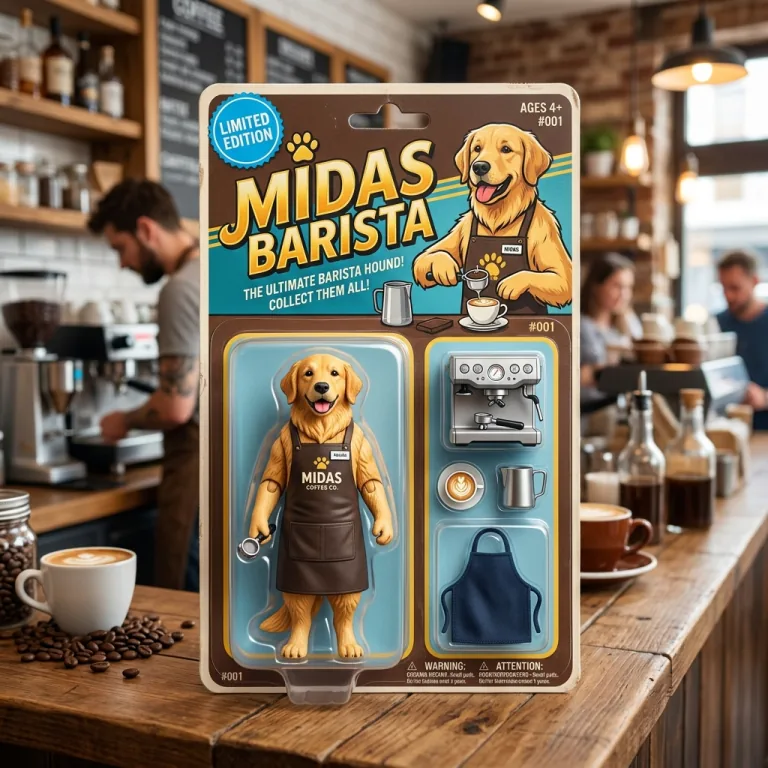
A golden retriever barista action figure in a retro blister pack labeled "MIDAS BARISTA", with a tiny espresso machine, latte cup, milk jug and apron
Nano Banana 2

a collectible action figure of a golden retriever barista sealed in a retro blister pack, accessories in molded slots: a tiny espresso machine, a latte cup, a milk jug and an apron, the card header reads "MIDAS BARISTA" with a "LIMITED EDITION" badge, glossy toy store product photo

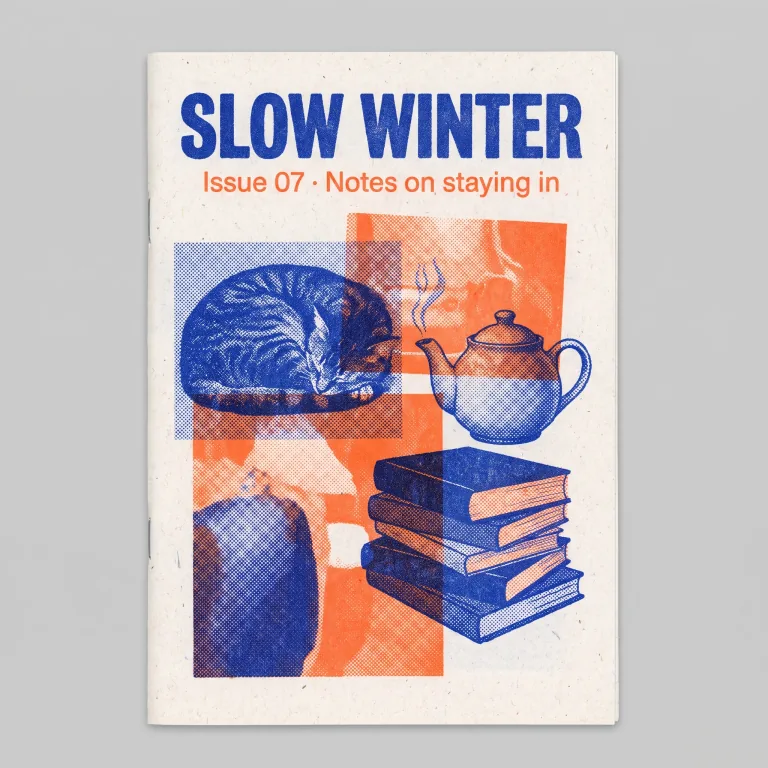
A blue and orange risograph zine cover titled "SLOW WINTER", Issue 07, with halftone collage of a sleeping cat, a teapot and a stack of books
Nano Banana Pro

a risograph-printed zine cover titled "SLOW WINTER" with the subtitle "Issue 07 · Notes on staying in", two-color cobalt blue and fluorescent orange ink, halftone collage of a sleeping cat, a teapot and a stack of books, slight misregistration and paper grain, flat scan

A miniature snowy village with lit cabins, pine trees and tiny skaters built on marshmallows inside a steaming mug of hot cocoa
Nano Banana 2.1

a tiny snowy alpine village with glowing windows built inside a mug of hot cocoa, marshmallow snowdrifts, a cinnamon-stick bridge, steam curling up like mist, miniature people skating on a frozen milk-foam pond, tilt-shift macro photo

What the Nano Banana MCP does

Nano Banana 2, Pro, 2.1 and Lite are all in the MakeMidas model list. When you ask for an image and name a version, the assistant calls the generate_image tool with that model, and the result comes back in a gallery in the chat with a download link. Without a version named, MakeMidas uses the cheapest model your account may use, so say "with Nano Banana" when you want it.

Each image is charged to your MakeMidas credits at the same price as on the website; the table below lists them. For what each version is and where it came from, see the Nano Banana guide.

Edit photos and combine references

Every Nano Banana version here takes up to 10 reference images, so you can ask it to edit a photo, restyle it or combine several pictures into one. In ChatGPT, attach it and say what to do with it: ChatGPT passes it to MakeMidas. Claude does not pass attached files to connectors, so paste a public link to the picture, or ask Claude for an upload link, which opens MakeMidas in your browser to add the picture there.

Pick a version, a size and a price

Nano Banana 2, Pro and 2.1 make images at 1K, 2K or 4K, and Nano Banana Lite at 1K. Ask for up to four images at once. To check a price before you spend anything, ask the assistant to estimate it first: the estimate_generation tool prices a request without charging. To see two versions side by side, ask it to compare them; compare_models runs one prompt on two to four image models.

Nano Banana settings and prices on MakeMidas

What each version takes here and what it costs in credits. The table follows the live prices.

VersionInputOutputSoundPrice
Nano Banana 2Text, up to 10 reference images1K, 2K, 4KNo sound
  • 25 credits per image at 1K
  • 35 credits per image at 2K
  • 50 credits per image at 4K
Nano Banana ProText, up to 10 reference images1K, 2K, 4KNo sound
  • 30 credits per image at 1K
  • 30 credits per image at 2K
  • 36 credits per image at 4K
Nano Banana 2.1Text, up to 10 reference images1K, 2K, 4KNo sound
  • 12 credits per image at 1K
  • 12 credits per image at 2K
  • 24 credits per image at 4K
Nano Banana LiteText, up to 10 reference images1KNo sound
  • 7 credits per image at 1K

Questions

How do I use Nano Banana in Claude?

Add MakeMidas as a custom connector (the Add to Claude button above opens it filled in), sign in to MakeMidas and allow access. Then ask Claude for an image "with Nano Banana" in any chat, on the web, desktop or mobile app.

How do I use Nano Banana in ChatGPT?

Add MakeMidas as a custom MCP server in ChatGPT, sign in and allow access; the ChatGPT guide walks through it. Then ask for an image "with Nano Banana", or attach a photo to edit.

Is the Nano Banana MCP free?

Connecting is free. Each image spends MakeMidas credits at the prices in the table above. A new account gets 50 credits once its email is verified, valid for 30 days on every model. Images made before the account pays carry a watermark. After that, credits come from a monthly plan or a one-time credit pack on the pricing page.

Can I edit a photo I already have?

In ChatGPT, attach it and say what to do with it: ChatGPT passes it to MakeMidas. Claude does not pass attached files to connectors, so paste a public link to the picture, or ask Claude for an upload link, which opens MakeMidas in your browser to add the picture there.

Does it work in Claude Code and Cursor?

Yes. In Claude Code, run the command in the setup box above, then type /mcp to sign in. Cursor, Codex, VS Code and Gemini CLI connect to the same server URL; the developer guide has the line for each. Coding agents can also use the MakeMidas CLI and agent skills.